Why I Chose Supabase Over Firebase — And When You Should Too
After building 4 production projects across both platforms, here's the honest comparison — what Supabase gets right, where Firebase still wins, and why I made the switch.
This isn't a feature-by-feature comparison pulled from documentation. I've shipped production projects on both Firebase and Supabase — a medical center platform, a school portal with real-time messaging, an e-learning marketplace, and my own brand platform.
After all of that, I have opinions. Some of them might surprise you.
My History with Both
I started with Firebase years ago — it was the obvious choice. Google-backed, great docs, instant real-time sync. For mobile-first projects and quick prototypes, it was magic.
Then I started building more complex systems. A medical platform with appointment booking, payment processing, and role-based access. A school portal with WebSocket messaging, attendance tracking, and GPS-based bus tracking. An e-learning platform with course management and exam systems.
The more relational and structured the data got, the more Firebase fought me. That's when I tried Supabase — and the shift was immediate.
Where Supabase Won Me Over
PostgreSQL Is a Real Database
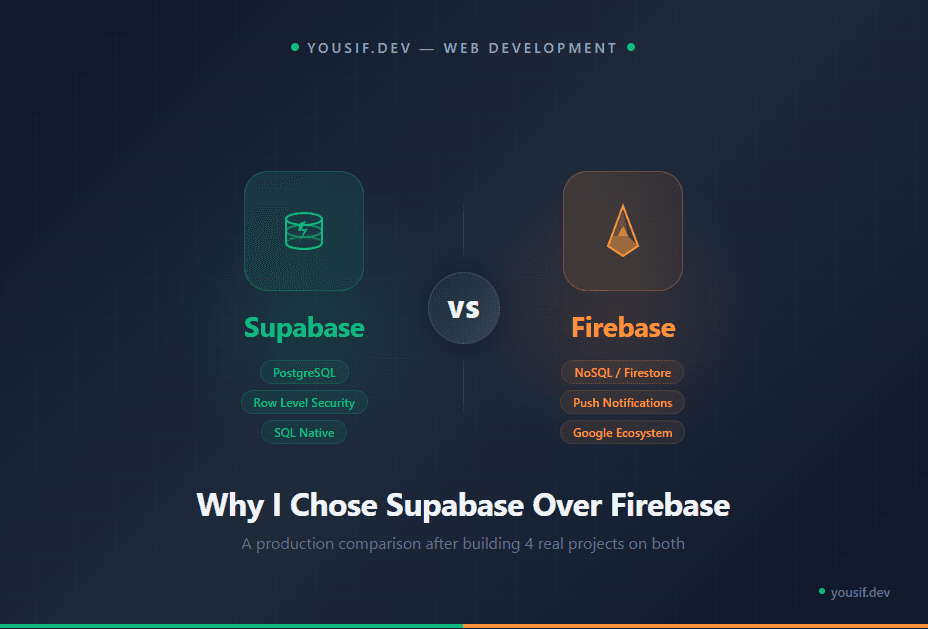
This is the biggest difference and it's not close. Supabase gives you a full PostgreSQL instance — relational integrity, foreign keys, complex joins, views, functions, triggers, and JSONB columns for the flexible parts.
Firebase's Firestore is a document database. It's great for simple, flat data. But the moment you need to query across collections, filter by nested fields, or maintain referential integrity — you're writing workarounds. Denormalization becomes your life.
With Supabase, I designed my platform's schema with 17 tables, proper foreign keys, and JSONB columns for flexible structures like course roadmaps and TipTap editor content. That mix of structure and flexibility is something Firestore simply can't offer.
Row Level Security Changes Everything
In Firebase, access control lives in security rules — a separate JSON-like syntax that's disconnected from your data layer. It works, but it's fragile and hard to test.
Supabase uses PostgreSQL's Row Level Security (RLS). Your access policies live right next to your data — in the database itself. One source of truth. You write SQL policies that are enforced at the database level, not the application level. No matter how someone accesses the data — API, direct connection, Edge Function — the rules apply.
RLS means your security can't be bypassed by a bug in your application code. The database enforces it.
The Free Tier Is Genuinely Useful
Supabase's free tier includes Auth, Storage, Realtime, Edge Functions, and 500MB of database storage. For a personal brand platform, a portfolio, or an MVP — that's more than enough to ship and validate.
Firebase's free Spark plan is also generous, but the billing model is usage-based. One viral moment or a misconfigured query can generate a surprise bill. With Supabase, you hit a limit and it stops. No surprises.
It Plays Perfectly with Next.js
Supabase has first-class SSR support for Next.js. The @supabase/ssr package handles cookie-based auth seamlessly with the App Router. Server Components can query the database directly. No extra API layer needed.
Firebase works with Next.js too, but it was designed for client-side first. Server-side auth with Firebase in the App Router requires more boilerplate and workarounds.
Where Firebase Still Wins
I'm not here to pretend Supabase is perfect for everything. Firebase has clear advantages in several areas.
Push Notifications (FCM)
Firebase Cloud Messaging is unmatched. For a school portal I built — where parents, teachers, and admins all needed real-time push notifications on mobile — FCM was the only practical choice. Supabase has no equivalent.
If your app needs mobile push notifications, you'll likely end up using Firebase for that specific feature regardless of your backend.
Ecosystem Maturity
Firebase has Analytics, Crashlytics, Remote Config, A/B testing, Dynamic Links, and Performance Monitoring — all integrated. It's Google's full mobile stack.
Supabase is a database, auth, storage, and edge functions. It does those things well, but it doesn't try to be an entire mobile platform. If you need that full ecosystem, Firebase is still the answer.
Real-time at Scale
Supabase has real-time subscriptions, and they work well for moderate use. But Firestore's real-time listeners are battle-tested at massive scale — millions of concurrent connections.
For a chat app, collaborative editor, or anything with high-frequency real-time updates across thousands of users simultaneously — Firestore has the edge.
The Real Decision Framework
The question isn't "which is better" — it's "which fits your project." Here's how I decide:
Need relational data with complex queries? → Supabase. No contest.
Need push notifications and mobile analytics? → Firebase. Nothing else comes close.
Building a content platform or SaaS? → Supabase. PostgreSQL was made for this.
Building a chat app or real-time game? → Firebase. Real-time is its DNA.
Solo developer who knows SQL? → Supabase. You'll feel at home instantly.
Team already in Google Cloud? → Firebase. The integration is seamless.
The best developers don't pick favorites — they pick the right tool for the job.
What I'd Warn You About with Supabase
Switching to Supabase isn't all upside. Here are the real gotchas I've hit:
Free tier pauses after inactivity. If your project gets no traffic for a week, Supabase pauses the database. Your site goes down until you manually unpause it. I use UptimeRobot to ping my endpoint every 5 minutes to prevent this. It's a workaround, not a solution.
Smaller community. Firebase has years of Stack Overflow answers, tutorials, and edge-case solutions. Supabase is growing fast, but when you hit an obscure issue, you might be reading GitHub issues instead of polished guides.
Migration needs planning. If you outgrow the free tier and want to self-host, the path exists (pg_dump, Docker) but it requires PostgreSQL knowledge. Firebase's lock-in is worse, but Supabase's exit isn't completely frictionless either.
Dashboard can be slow. The Supabase web dashboard occasionally lags, especially the SQL editor with large queries. Minor annoyance, but worth mentioning.
My Stack Today
Supabase is my default backend for new projects. PostgreSQL + Auth + Storage + Edge Functions covers 90% of what I need. My platform runs on it, and I haven't looked back.
But I still use Firebase where it makes sense. The school portal uses Firebase Cloud Messaging for push notifications alongside a Django + PostgreSQL backend. Using the right tool for the right job isn't disloyalty — it's engineering.
If you're starting a new project today and you know SQL — give Supabase a serious look. You might not go back either.